How AI Voice Scams Work & How Seniors Can Protect Themselves
Discover how voice cloning and AI-generated photos are used in scams. Learn to establish family code words and verify identity in the age of deepfakes.
 Admin
Admin 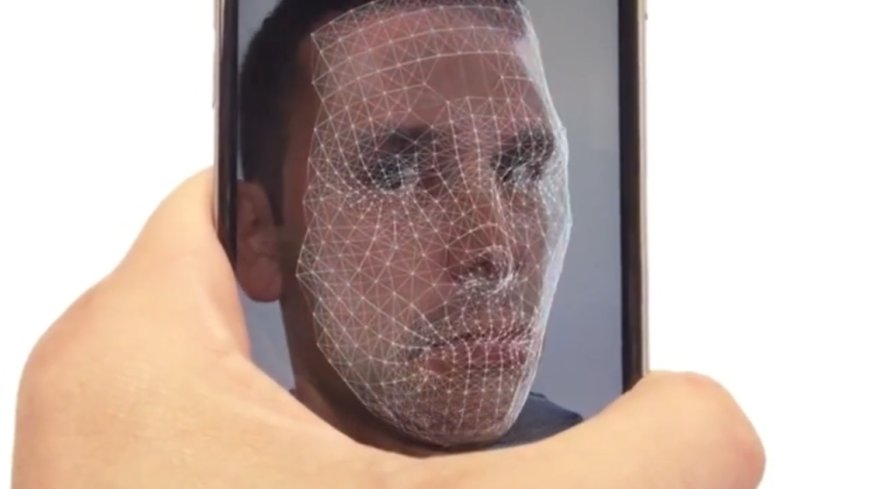
Welcome back to CyberSmarts for Seniors. This series is created especially for seniors who want to stay safe, confident, and connected in today's digital world.
In our previous videos, we've covered many common scams, but today we're going to talk about something newer and particularly concerning – scams that use artificial intelligence and advanced technology.
Now, I know "artificial intelligence" might sound complicated, but don't worry. We're going to explain this in plain language, and more importantly, we'll give you simple ways to protect yourself.
Here's what you need to know. Scammers are now using computer programs that can copy voices, create fake photos, and even generate videos of people who don't exist or people saying things they never said.
This might sound like science fiction, but it's happening right now, and it's becoming more common every month.
The good news? Even with this new technology, scammers still use the same old tricks – creating urgency, asking for money, and pressuring you to act quickly. And you can still protect yourself.
Voice Cloning Technology.
Let me tell you about one of the most concerning new scams: voice cloning.
Here's what happens. Scammers can now copy someone's voice using just a few seconds of audio. Where do they get that audio? Sometimes from videos posted on social media, voicemail greetings, or even public videos online.
Remember the grandparent scam we talked about in an earlier video? It's gotten more sophisticated.
You might receive a call, and it actually sounds like your grandchild's voice. Not similar to their voice – it sounds exactly like them. They say they're in trouble, they're scared, and they need money urgently.
The emotional manipulation is the same, but now the voice sounds completely real, which makes it much harder to recognise as a scam.
This happened to a woman in Ontario just last year. She received a call that sounded exactly like her grandson. He said he'd been in a car accident and needed bail money immediately.
She was about to send eight thousand dollars before her daughter convinced her to call her grandson first. When they called, he was sitting safely in his college dorm room, completely fine.
Protection Against Voice Cloning.
Here's how to protect yourself from voice cloning scams.
Talk with your family members right now – today – about establishing a code word or secret question that only you and they would know. This could be a specific childhood nickname, the name of a beloved family pet from years ago, a question about a shared family memory, or a made-up word that has meaning only to your family.
If someone calls claiming to be your grandchild or another family member in an emergency, ask them the secret question. A scammer using cloned audio won't know the answer.
Even if the voice sounds perfect, tell them you'll call them right back at their regular number. A real family member will understand. A scammer will pressure you to stay on the line.
Ask specific questions only the real person would know. "What did we talk about last Sunday at dinner?" "What's your roommate's name?" "What did I give you for your last birthday?"
Voice cloning can copy how someone sounds, but it can't give the scammer memories or knowledge.
AI-Generated Photos and Videos.
This next threat is particularly concerning for anyone using dating sites or social media.
Scammers can now create photographs of people who don't exist at all. These aren't photos of real people – they're completely generated by computer programs, and they look absolutely real. Beautiful faces, professional-looking backgrounds, completely fake.
In our video about romance scams, we talked about people who create fake profiles. Now, they don't even need to steal someone else's photos – they can generate completely fake people.
They might send you dozens of photos of "themselves" – at the beach, at work, with a pet. But none of it is real.
Even more concerning, they can now create short video clips using this technology. So even if you ask for a video call, they might send you a fake video that looks real.
While this technology is sophisticated, there are still signs you can watch for.
Look at the details. Are the ears slightly different from each other? Are there strange blurs or distortions in the background? Do their teeth look unusual or too perfect? If they're wearing jewellery, does it look odd or distorted? Look at their hands – AI often struggles with hands and fingers.
Watch for background inconsistencies. Does the background change in odd ways between photos? Are there objects that look warped or don't make sense?
Verification for Online Relationships.
If you're talking with someone online, especially on dating sites, insist on live video calls. Not pre-recorded videos, but real-time conversations. Ask them to do something specific during the call – wave their left hand, hold up three fingers, turn their head to the side. Have these calls at random times, not scheduled days in advance.
Be wary of excuses. If someone always has a reason why they can't do a video call – broken camera, bad internet connection, too shy – that's a red flag. In today's world, video calls are easy and common.
Trust your instincts. If something feels off about the photos or if the person seems too good to be true, they probably are.
Future-Proofing Your Protection.
Here's the reality. This technology is going to keep improving, and scammers will keep finding new ways to use it. But here's what won't change.
The fundamentals of protection remain the same.
Slow down. Advanced technology doesn't change the fact that scammers need you to act quickly without thinking.
Verify identity. No matter how real something looks or sounds, always verify through a separate, trusted method.
Never send money to people you haven't met in person. This rule is even more important now.
Trust your instincts. If something feels wrong, it probably is, regardless of how convincing it seems.
Technology scams evolve quickly. Make it a habit to check the Canadian Anti-Fraud Centre website occasionally for updates, talk with family members about new scam techniques, attend community presentations when available, and don't be afraid to ask questions when you encounter something new.
You now understand how voice cloning and AI-generated content are being used in scams. You know the warning signs and how to verify identity even when technology makes things seem real. Most importantly, you know that the fundamental protection strategies still work – slow down, verify, and trust your instincts.
These new technologies might sound frightening, but you now know how to protect yourself. By verifying identities, taking your time, and trusting your instincts, you're already ahead of the scammers.
That's why we created CyberSmarts for Seniors - to help you stay informed about emerging threats while maintaining your confidence in using technology safely.
In our next video, we'll give you a complete protection toolkit with practical strategies you can use every day.
Thank you for watching. Stay safe, stay alert, and remember - when something seems too real to be true, take time to verify.
.
Check out the Video Series:
Video 1: Introduction to Scam Awareness
Video 2: The Scammer's Playbook
Video 4: Online & Digital Threats
Video 5: Financial & Romance Scams
Video 6: New Technology Threats
Video 7: Your Protection Toolkit
Video 8: What to Do If You're Targeted
Video 9: Resources & Staying Safe
Watch Video 10: Empowerment & Community
.
Return to the Introduction to the Video Series:
Protecting Yourself from Scams: A Complete Guide for Seniors in Canada
.
Return to the CyberSmarts for Seniors Introduction:
CyberSmarts for Seniors: Practical Lessons to Build Digital Confidence and Safety
.
.
.

This resource is part of the CyberSmarts for Seniors Project, funded in part by the Government of Canada’s
New Horizons for Seniors Program and ELNOS, and delivered in Elliot Lake by Raknas Inc. and Golden Voices, the seniors-focused division of the DiversityCanada Foundation.
.
.